Sprint Planning
Standalone agile sprint boards with customizable columns, story points, and task cards.
While Umbra's spatial kanban columns let you structure cards across the broader canvas, the Sprint Board block packs a complete agile workflow into a single self-contained card.
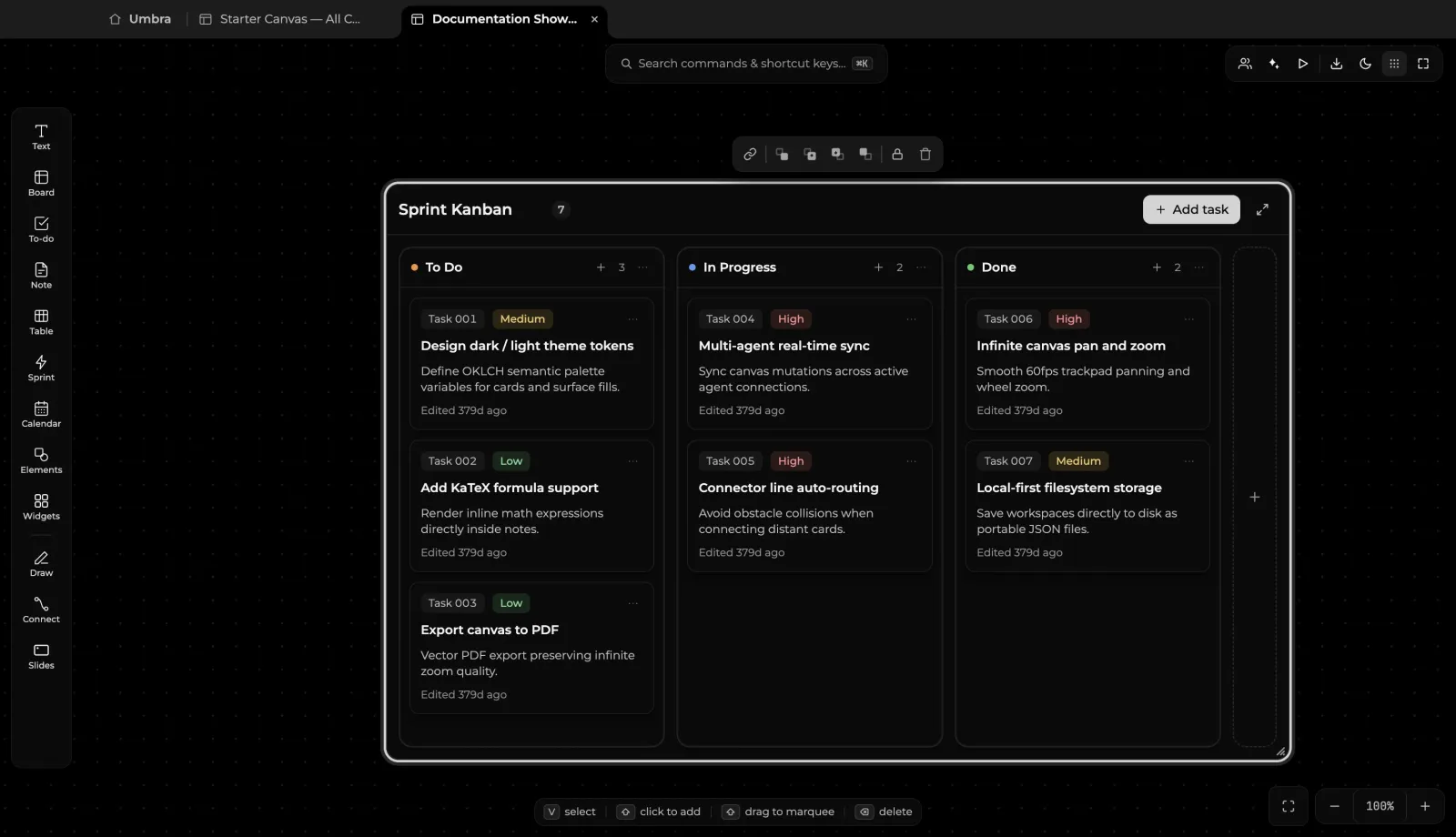
The Sprint Block Architecture
- Self-Contained Container: A sprint board is a single block that can be moved, resized, or minimized as a unit without disorganizing surrounding board items.
- Preconfigured Workflow Columns:
To Do: Product backlog items queued for executionIn Progress: Active work items with work-in-progress (WIP) limit warningsDone: Completed deliverables with completion timestamps
- Card Attributes:
- Story Points & Estimates: Assign numerical weights or hour estimates to each task.
- Priority Levels: High, Medium, and Low severity color badges.
- Assignees: Designate task ownership across collaborators.
- Drag-and-Drop Task Flow: Drag cards horizontally across columns to update task status in real time.
Using Sprints on Your Canvas
- Select the Sprint tool on the left toolbar.
- Place the sprint block near your project brief, architecture diagrams, or research documents.
- Click
+ Add taskwithin any column to append new tasks. - Draw smart connectors (
C) from tasks in your sprint board to technical specs, spreadsheet financial models, or design sub-canvases.